Scale Calculator - Architectural, Map & Model Lengths
Convert between real-world dimensions and scale drawing or model lengths, and calculate exact metric or imperial scale ratios in your browser.
🔒 Secure Calculation: Fast and private with zero data stored.
How to Use
- Choose your conversion direction or scale ratio mode from the Calculation Type menu above.
- Set the Drawing Scale (D) and Real-World Scale (R) values, or click a Scale Preset button for standard architectural and model ratios.
- Input your known measurement and choose the source and target length units (mm, cm, m, km, in, ft, or yd).
- Review the converted length or simplified scale ratio along with the step-by-step unit conversion breakdown below.
Options Explained
- Calculation Type: Switches between finding a scale drawing length from a real-world size, calculating a full-size real-world dimension from a drawing or model measurement, and determining the exact scale ratio from both lengths.
- Scale Presets: One-click buttons that populate common architectural, imperial blueprint, and scale modeling ratios, including 1:20 Detail, 1:50 Plan, 1:100 Arch, 1/4" = 1' (1:48), 1:72 Model, and 1:87 HO.
Key Features
- Two-way length scaling between architectural drawings, maps, or scale models and full-size real-world structures.
- Cross-system unit conversion across 7 metric (mm, cm, m, km) and imperial (in, ft, yd) length units using exact NIST SP 811 conversion factors.
- Calculates exact scale ratios in both unit ratio form (1 : n) and lowest integer terms using the greatest common divisor (GCD), classifying results as Reduction Scale, Full Size (1:1), or Enlargement Scale per ISO 5455.
- Six one-click presets for architectural plans (1:20 Detail, 1:50 Plan, 1:100 Arch), imperial blueprints (1/4" = 1' / 1:48), and hobby models (1:72 Model, 1:87 HO).
- Built-in input validation that blocks zero or negative lengths and prevents division-by-zero scale factor errors.
- Runs 100% locally in your web browser with zero server data storage.
Scale Factor Formula and Step-by-Step Proof
The scale calculator converts measurements between drawing units and real-world dimensions by normalizing all inputs to a base millimeter (mm) value before applying the drawing-to-real scale ratio (D : R):
1. Real-World to Scale Drawing Length: L_real(mm) = L_real × UnitFactor_real ⇒ L_draw = (L_real(mm) × (D / R)) / UnitFactor_draw
2. Scale Drawing to Real-World Length: L_draw(mm) = L_draw × UnitFactor_draw ⇒ L_real = (L_draw(mm) × (R / D)) / UnitFactor_real
3. Find Scale Ratio: Unit Ratio = 1 : (L_real(mm) / L_draw(mm)) | Integer Ratio = (L_draw(mm) / GCD) : (L_real(mm) / GCD)
Normalizing mixed metric and imperial inputs to a common millimeter base—where 1 inch equals exactly 25.4 mm and 1 foot equals 304.8 mm—before multiplying by the scale ratio prevents cross-system unit mismatch and floating-point rounding errors.
Developed and maintained by the CalcPly team, this tool adheres to ISO 5455 technical drawing scale conventions and official NIST SP 811 linear measurement standards.
Example Input and Output
Example Input
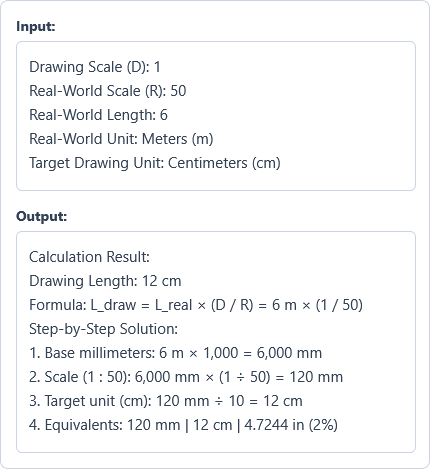
Drawing Scale (D): 1
Real-World Scale (R): 50
Real-World Length: 6
Real-World Unit: Meters (m)
Target Drawing Unit: Centimeters (cm)
Options used: Calculation Type: Find Scale / Drawing Length from Real-World Size | Scale Presets: 1:50 Plan
Example Output
Calculation Result:
Drawing Length: 12 cm
Formula: L_draw = L_real × (D / R) = 6 m × (1 / 50)
Step-by-Step Solution:
1. Base millimeters: 6 m × 1,000 = 6,000 mm
2. Scale (1 : 50): 6,000 mm × (1 ÷ 50) = 120 mm
3. Target unit (cm): 120 mm ÷ 10 = 12 cm
4. Equivalents: 120 mm | 12 cm | 4.7244 in (2%)
Scaling a 6-meter real-world wall down at a 1 : 50 architectural plan ratio produces a drawing length of 12 centimeters (120 mm, or 4.7244 inches), representing 2% of full size.
Frequently Asked Questions
How do you convert a real-world measurement to a scale drawing length?
Divide the real-world measurement by the scale factor—or multiply it by the drawing-to-real ratio (D / R)—after converting to your target unit. For example, on a 1 : 50 floor plan, a 6-meter wall (600 cm) divided by 50 equals 12 cm on the drawing.
Why does the architectural scale 1/4" = 1'-0" equal a 1:48 ratio?
One foot contains 12 inches, and dividing 12 inches into quarter-inch increments yields 48 quarter-inches per foot (12 ÷ 0.25 = 48). Because 1/4 inch on the blueprint represents 48 quarter-inches (1 foot) in reality, the dimensionless scale ratio is 1 : 48.
What is the difference between a reduction scale and an enlargement scale?
A reduction scale (such as 1 : 50 or 1 : 100) shrinks large buildings, rooms, or land parcels so they fit onto a drawing sheet, whereas an enlargement scale (such as 2 : 1 or 5 : 1) magnifies small watch gears, fasteners, or electronic components for clear detailing under ISO 5455 standards.
How do I find the scale ratio of an unlabelled blueprint or map?
Measure a known feature on the drawing with a ruler, convert both the drawing measurement and the real-world dimension into the same unit (such as millimeters), and divide the real-world length by the drawing length. A 12 cm (120 mm) line representing a 6 m (6,000 mm) room gives 6,000 ÷ 120 = 50, or a 1 : 50 scale.
What are the most common scale ratios for architectural plans and hobby models?
Architectural floor plans and construction details commonly use 1 : 20, 1 : 50, 1 : 100, 1 : 200, and the US imperial standard 1/4" = 1'-0" (1 : 48). Scale modelers typically build military vehicles at 1 : 35, aircraft at 1 : 48 or 1 : 72, and HO-gauge model railways at 1 : 87.
Does this scale calculator save or send my blueprint measurements to a server?
No. Every scale conversion and ratio calculation runs directly in your web browser on your device, so your architectural dimensions and model measurements are never stored or sent to any server.