Aspect Ratio Calculator - Resize and Scale Dimensions
Calculate aspect ratios, resize image and video dimensions proportionally, and simplify ratio values with exact arithmetic breakdown.
🔒 Secure Calculation: Fast and private with zero data stored.
How to Use
- Select a calculation type from the dropdown menu above.
- Enter your known dimensions, or click a ratio preset button to populate standard proportions.
- View the scaled dimensions, simplified integer ratio, and step-by-step arithmetic below.
Options Explained
- Calculation Type: Choose whether to calculate a new height from width, calculate a new width from height, or find and simplify the aspect ratio of existing dimensions.
- Ratio Presets: Quick-select buttons for standard formats, including 16:9 HD, 4:3 TV, 1:1 Square, 9:16 Vertical, 21:9 Ultrawide, and 3:2 Photo.
Key Features
- Proportional dimension scaling for image and video resolutions with zero distortion.
- Automatic ratio simplification to the smallest whole numbers using the greatest common divisor (GCD).
- Automatic orientation detection (landscape, portrait, or square) and standard display format matching.
- Built-in checks for positive width and height values to prevent invalid zero or negative dimensions.
- 100% client-side computation in your browser with zero data transfer or server storage.
- One-click ratio presets for popular display, video, and photography formats (16:9, 4:3, 1:1, 9:16, 21:9, 3:2).
Aspect Ratio Formula and Step-by-Step Proof
The aspect ratio calculator computes proportional dimensions and simplifies width-to-height ratios using cross-multiplication and greatest common divisor (GCD) reduction:
1. Resize Height: H2 = (W2 × H1) / W1
2. Resize Width: W2 = (H2 × W1) / H1
3. Simplified Aspect Ratio: (W / GCD(W, H)) : (H / GCD(W, H))
4. Decimal Aspect Ratio: D = W / H
Dividing both dimensions by their greatest common divisor produces exact whole-number ratios without decimal rounding errors.
Developed and maintained by the CalcPly team, this tool follows standard geometric proportion rules and international display standards.
Example Input and Output
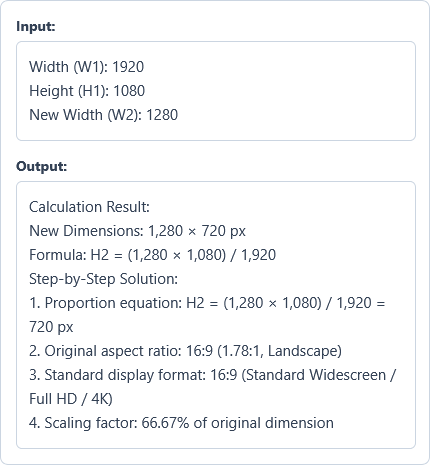
Example Input
Width (W1): 1920
Height (H1): 1080
New Width (W2): 1280
Options used: Calculation Type: Calculate New Height from Width (Resize) | Ratio Presets: OFF
Example Output
Calculation Result:
New Dimensions: 1,280 × 720 px
Formula: H2 = (1,280 × 1,080) / 1,920
Step-by-Step Solution:
1. Proportion equation: H2 = (1,280 × 1,080) / 1,920 = 720 px
2. Original aspect ratio: 16:9 (1.78:1, Landscape)
3. Standard display format: 16:9 (Standard Widescreen / Full HD / 4K)
4. Scaling factor: 66.67% of original dimension
The calculation gives an exact proportional height of 720 pixels, preserving the original 16:9 widescreen ratio without distortion.
Frequently Asked Questions
What is an aspect ratio?
An aspect ratio is the proportional relationship between the width and height of an image, video, or screen, written as two numbers separated by a colon (W:H). For example, a 16:9 ratio means that for every 16 units of width, there are 9 units of height, regardless of the actual screen size.
How do I calculate a new height while keeping the aspect ratio?
Multiply the new width by the original height, then divide by the original width [H2 = (W2 × H1) / W1]. This cross-multiplication keeps the exact same proportions, ensuring your image or video resizes without stretching or distortion.
What is the difference between 16:9 and 4:3?
A 16:9 ratio is the modern widescreen standard (1.78:1) used for HD video, televisions, and computer monitors, while 4:3 is a more square format (1.33:1) used in classic television broadcasts, tablets, and photography.
Can this calculator simplify ratios with decimal numbers?
Yes. The calculator converts decimal dimensions into whole numbers by multiplying both values by a power of 10 before finding their greatest common divisor. This produces an exact whole-number ratio without losing accuracy.
What happens if I enter zero or negative dimensions?
The calculator displays an error message right away. Width and height must be positive numbers greater than zero to represent real dimensions and avoid division by zero.
Does this calculator send my dimensions to any server?
No. All calculations run directly in your web browser on your device, ensuring complete privacy with zero data stored or sent to any server.