Percentage Calculator - Value, Ratio, Markup & Change
Calculate percentage values, find percentage increase or decrease between numbers, and solve common percentage problems instantly.
🔒 Secure Calculation: Fast and private with zero data stored.
How to Use
- Choose a percentage formula from the Calculation Type menu above.
- Enter your values into the corresponding input boxes.
- View the instant calculation result, applied formula, and step-by-step arithmetic below.
Options Explained
- Calculation Type: Switches between finding a percentage of a number, calculating a percentage ratio, determining percentage change, and applying markups or discounts.
- Action: Toggles between adding a percentage (sales tax, markup) and subtracting a percentage (discount, markdown).
Key Features
- Four dedicated percentage calculation modes covering values, ratios, rate of change, and markups.
- Instant real-time calculations with high numerical precision to eliminate decimal rounding errors.
- Step-by-step mathematical breakdown showing intermediate algebraic operations.
- Full support for decimals, positive and negative numbers, and large values.
- 100% client-side calculation in your browser with zero server data storage.
- Responsive layout optimized for rapid input on desktop and mobile devices.
Percentage Formula and Step-by-Step Proof
The percentage calculator computes relative proportions, base percentages, and rates of change using standard algebraic formulas:
1. Percentage Value: Y = (P / 100) × X
2. Percentage Ratio: P = (X / Y) × 100%
3. Percentage Change: Δ% = ((Y - X) / |X|) × 100%
4. Add / Subtract %: Y = X × (1 ± (P / 100))
Retaining full precision during intermediate steps and rounding only the final output prevents decimal rounding errors across multi-step percentage calculations.
Developed and maintained by the CalcPly team, this tool follows standard international algebraic conventions and mathematical principles.
Example Input and Output
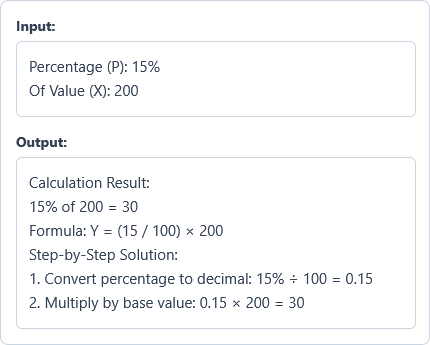
Example Input
Percentage (P): 15%
Of Value (X): 200
Options used: Calculation Type: What is P% of X? (Percentage Value) | Action: OFF
Example Output
Calculation Result:
15% of 200 = 30
Formula: Y = (15 / 100) × 200
Step-by-Step Solution:
1. Convert percentage to decimal: 15% ÷ 100 = 0.15
2. Multiply by base value: 0.15 × 200 = 30
The tool calculates an exact value of 30 representing 15% of 200.
Frequently Asked Questions
How do you calculate a percentage of a number?
Divide the percentage by 100 to convert it into a decimal, then multiply that decimal by the base value. For example, to find 15% of 200, compute (15 ÷ 100) × 200 = 0.15 × 200 = 30.
What is the difference between percentage change and percentage difference?
Percentage change measures how much a value increases or decreases from an initial starting number, whereas percentage difference compares two independent numbers relative to their average. Percentage change can be positive or negative, while percentage difference is always a positive value.
What happens if I divide by zero?
Division by zero is mathematically undefined. If you enter zero as the total value in a ratio or as the starting value in a percentage change, the calculator stops and shows a clear error message.
Can I enter negative percentages or numbers?
Yes. The calculator fully supports negative inputs for base values, rates of change, and adjustments following standard algebraic rules. For example, a negative percentage change indicates a decrease, while subtracting a negative percentage results in a net increase.
Does this calculator store my numbers on a server?
No. Every percentage calculation happens directly in your browser, so your numbers are never sent to or stored on any server.