Time Calculator - Add or Subtract Hours & Minutes
Add or subtract days, hours, minutes, and seconds between two time durations, or calculate the exact clock time after any elapsed interval.
🔒 Secure Calculation: Fast and private with zero data stored.
How to Use
- Choose a mode in the Calculation Mode menu to either combine two time durations or shift a starting clock time.
- Enter your first duration (Days, Hours, Minutes, Seconds) or starting 24-hour clock time, or click "Now" or "Sample" to fill the boxes.
- Select "+ Add" or "− Subtract" in the Operation menu, enter your second duration below, or click the swap button (⇄) to reverse both durations.
- Check the calculated duration or target clock time in 24-hour and 12-hour formats, full unit conversions, and shareable link below.
Options Explained
- Calculation Mode: Switches between adding or subtracting two time intervals (Duration Mode) and finding the exact time of day after adding or subtracting a duration from a 24-hour start time (Clock Time Mode).
- Operation: Selects whether to add the second duration to the first value (+ Add time durations) or subtract the second duration from the starting value (− Subtract time durations).
Key Features
- Dual calculation modes for combining two separate time durations or shifting a 24-hour starting clock time.
- Automatic rollover and carry-over across seconds, minutes, hours, and days without manual base-60 conversion.
- Side-by-side 24-hour (HH:MM:SS) and 12-hour (AM/PM) clock outputs with automatic multi-day rollover tracking.
- Complete unit conversion table showing total time in decimal days, decimal hours, decimal minutes, and exact seconds.
- Support for negative duration results when subtracting a longer time interval from a shorter starting duration.
- 100% browser-based time calculation with instant shareable links and zero data stored on any server.
Time Addition and Subtraction Formula and Calculation Logic
The time calculator adds or subtracts durations and clock intervals by converting all inputs into total seconds, performing exact whole-number arithmetic, and converting the result back into standard time units:
Step 1: Convert Input Units into Total Seconds
Every duration input is first converted to a single base value in seconds using standard International System of Units (SI) time ratios (1 minute = 60 seconds, 1 hour = 3,600 seconds, and 1 day = 86,400 seconds):
Total Seconds (T) = (Days × 86,400) + (Hours × 3,600) + (Minutes × 60) + Seconds
Net Seconds = T1 ± T2
Step 2: Regroup Total Seconds into Days, Hours, Minutes, and Seconds
In Duration Mode, the absolute value of the net seconds is divided step by step using whole-number division and remainders so that minutes and seconds always stay between 0 and 59, and hours stay between 0 and 23:
Days = Whole part of (|Net Seconds| ÷ 86,400)
Remaining Seconds after Days = |Net Seconds| − (Days × 86,400)
Hours = Whole part of (Remaining Seconds after Days ÷ 3,600)
Remaining Seconds after Hours = Remaining Seconds after Days − (Hours × 3,600)
Minutes = Whole part of (Remaining Seconds after Hours ÷ 60)
Seconds = Remaining Seconds after Hours − (Minutes × 60)
Step 3: 24-Hour Clock Cycle Rollover (Clock Time Mode)
When adding or subtracting a duration from a starting clock time, the start time is measured in seconds from midnight (00:00:00). After applying the duration change, the calculator tracks how many 86,400-second day boundaries are crossed and wraps the remaining seconds within the 24-hour clock cycle:
Start Clock Seconds = (Start Hour × 3,600) + (Start Minute × 60) + Start Second
Target Clock Seconds = Start Clock Seconds ± Duration Seconds
Day Shift = Whole days crossed (every 86,400-second cycle forward or backward)
Wrapped Clock Seconds = Target Clock Seconds adjusted into the 0 to 86,399 range
Converting all time units into whole seconds before adding or subtracting avoids base-60 borrowing mistakes, while high-precision decimal rounding prevents rounding errors when converting totals into decimal days, hours, and minutes.
Developed and maintained by the CalcPly team, this calculator uses standard SI time unit definitions and ISO 8601 24-hour timekeeping rules for reliable duration and clock calculations.
Example Input and Output
Example Input
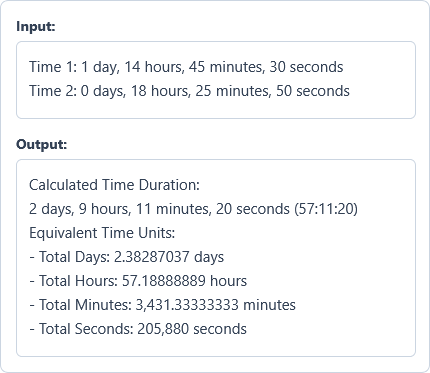
Time 1: 1 day, 14 hours, 45 minutes, 30 seconds
Time 2: 0 days, 18 hours, 25 minutes, 50 seconds
Options used: Calculation Mode: Add or Subtract Two Time Durations | Operation: + Add time durations
Example Output
Calculated Time Duration:
2 days, 9 hours, 11 minutes, 20 seconds (57:11:20)

Equivalent Time Units:
- Total Days: 2.38287037 days
- Total Hours: 57.18888889 hours
- Total Minutes: 3,431.33333333 minutes
- Total Seconds: 205,880 seconds
Adding 18 hours, 25 minutes, and 50 seconds to 1 day, 14 hours, 45 minutes, and 30 seconds yields a total duration of 2 days, 9 hours, 11 minutes, and 20 seconds (57:11:20).
Frequently Asked Questions
How do you add minutes and seconds when the total reaches 60 or more?
Divide the total by 60, carry the whole number to the next larger time unit, and keep the remainder. For example, 75 seconds equals 1 minute and 15 seconds, and 130 minutes equals 2 hours and 10 minutes.
Can I enter values larger than 59 minutes or 23 hours in the duration fields?
Yes. In Duration Mode, you can enter any whole number up to 1,000,000 in the days, hours, minutes, or seconds boxes. Entering 150 minutes automatically converts and displays as 2 hours and 30 minutes in the result.
What happens if I subtract a longer duration from a shorter duration?
The calculator computes the exact difference and marks the result with a minus sign (−) to indicate a negative time interval. For instance, subtracting 2 hours from 45 minutes returns −1 hour, 15 minutes (−1:15:00).
How does Clock Time Mode handle crossing midnight into another day?
It wraps the clock around the 24-hour cycle (00:00:00 to 23:59:59) and reports the exact number of days crossed. Adding 5 hours to 22:00:00 lands on 03:00:00 (03:00:00 AM) and displays "Next day (+1 day)" in the rollover summary.
How are hours, minutes, and seconds converted into decimal hours?
Divide the minutes by 60 and the seconds by 3,600, then add both fractions to the whole hours. For example, 2 hours, 15 minutes, and 36 seconds equals 2 + (15 ÷ 60) + (36 ÷ 3,600), which is 2.26 decimal hours.
Does this time calculator send or store my entered values on any server?
No. All time additions, subtractions, and unit conversions happen directly inside your browser on your own device, so your time entries are never sent to or stored on any server.