Date Calculator - Add or Subtract Days from Date
Add or subtract years, months, weeks, and days from any calendar date to find exact future deadlines or past dates.
🔒 Secure Calculation: Fast and private with zero data stored.
How to Use
- Select a start date in the date box above, click "Today" for the current date, or click "Sample" to load an example.
- Choose "+ Add to date (Future)" or "− Subtract from date (Past)" from the operation menu, or click "Clear" to reset all boxes.
- Enter your duration in years, months, weeks, or days, and check "Count business days only" if you want to skip weekends.
- View the target date and day breakdown below, then click "Copy", "Download", or "Copy Link" to save or share your result.
Options Explained
- Operation: Sets the calculation direction to either move forward to a future date (+ Add) or count backward to a past date (− Subtract).
- Count business days only: Skips Saturdays and Sundays so the duration is counted only across Monday-to-Friday working days.
Key Features
- Forward and backward date calculations to find exact future deadlines or past calendar dates.
- Combined duration boxes that let you add or subtract years, months, weeks, and days at once.
- Automatic Gregorian leap-year handling and smart month-end date adjustment across 28- to 31-day months.
- Optional business-day filter that skips Saturdays and Sundays for weekday project schedules.
- Full summary table showing the target weekday, ISO 8601 date, working days, weekend days, and total hours.
- Built-in "Today", "Sample", "Clear", "Copy", "Download", and "Copy Link" buttons for fast browser-based scheduling.
Date Calculator Formula and Calculation Logic
The date calculator finds target calendar dates using UTC midnight to prevent daylight saving time shifts and time zone errors. The calculation runs in two steps:
Step 1: Month and Year Adjustments (Month-End Date Adjustment)
Years and months are added or subtracted first. If the start day is greater than the total days in the target month, the date adjusts to the last valid day of that month:
Target Year = Start Year + floor((Start Month - 1 ± ΔYears × 12 ± ΔMonths) / 12)
Target Month = ((Start Month - 1 ± ΔMonths) mod 12) + 1
Anchor Day = min(Start Day, Days in Target Month)
Step 2: Week and Day Adjustments
Starting from that adjusted anchor date, weeks and days are applied based on your selected mode:
Calendar Days Mode:
Target Date = Anchor Date ± (Weeks × 7 + Days)

Business Days Mode:
Year & Month Span = |UTC(Anchor Date) - UTC(Start Date)| / 86,400 seconds
Total Business Days = Year & Month Span + (Weeks × 7) + Days
In business-day mode, the total day span from your selected years, months, weeks, and days is counted from the start date. The tool steps only across Monday-to-Friday weekdays and skips all Saturdays and Sundays.
Adjusting month-end dates before adding days prevents calendar rollover errors and maintains leap-year accuracy across month boundaries.
Developed and maintained by the CalcPly team, this calculator applies standard Gregorian calendar rules and ISO 8601 date formatting for accurate scheduling.
Example Input and Output
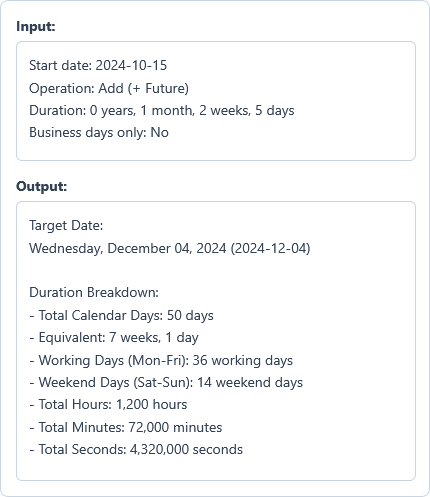
Example Input
Start date: 2024-10-15
Operation: Add (+ Future)
Duration: 0 years, 1 month, 2 weeks, 5 days
Options used: Count business days only: OFF
Example Output
Target Date:
Wednesday, December 04, 2024 (2024-12-04)

Duration Breakdown:
- Total Calendar Days: 50 days
- Equivalent: 7 weeks, 1 day
- Working Days (Mon-Fri): 36 working days
- Weekend Days (Sat-Sun): 14 weekend days
- Total Hours: 1,200 hours
- Total Minutes: 72,000 minutes
- Total Seconds: 4,320,000 seconds
Starting from October 15, 2024, adding 1 month, 2 weeks, and 5 days reaches December 4, 2024, spanning 50 calendar days.
Frequently Asked Questions
How does the calculator handle adding a month to the 31st?
It automatically adjusts to the last valid day of that target month. For example, adding one month to January 31 lands on February 28 (or February 29 during a leap year), preventing the date from rolling over into March.
Does this tool accurately calculate leap years?
Yes. It follows Gregorian leap-year rules across every 4-year and 400-year cycle. Adding 1 year to February 29, 2024 lands on February 28, 2025, while adding 4 years lands on February 29, 2028.
What is the difference between calendar days and business days?
Calendar days count every consecutive day including weekends, while business days count only Monday through Friday. Because this filter skips Saturdays and Sundays without tracking regional public holidays, you should adjust manually for official holidays in your area.
Can I calculate dates in the past by subtracting days?
Yes. Select "− Subtract from date (Past)" in the operation menu to count backward from a known deadline and find past start dates or notice periods.
What happens if I enter zeros across all duration fields?
Entering zero across all duration boxes returns your exact start date with zero elapsed days, keeping the calculation valid without errors.
Is my calculation data stored or tracked on any server?
No. All date calculations run directly inside your web browser with zero server storage. When you click "Copy Link", your inputs are placed into the shareable URL so you can bookmark or share the schedule safely.